Filling Out PDF and Word Forms
mentalhealthGPT fills out your own PDF or Word form—such as an insurance pre-approval form—directly from the file. You select the fields, review each entry, and save the form to your device.
What would you like to do with your document?
I want to fill out a form or my own template.
For example, a letter of coverage from an insurance company, a report for your primary care physician, or your own template for the case report.
The form remains in your browser. When you're done, save the completed form to your device.
I want to file a document related to the case.
For example, a preliminary report or a diagnosis that mentalhealthGPT should be aware of.
Here's what it looks like in mentalhealthGPT
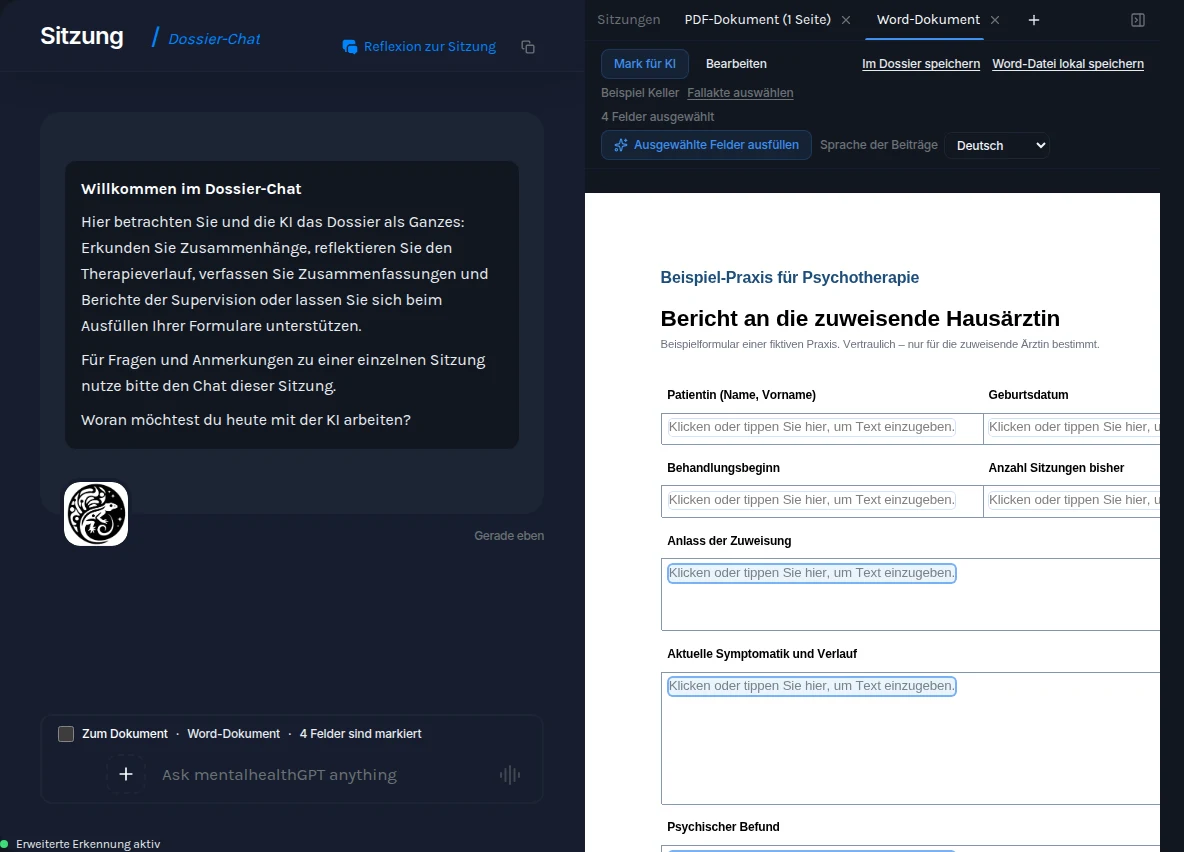
- ADossier—Chat. Here, you can discuss the case with mentalhealthGPT .
- BWorkspace. Your forms are on the right, each in its own tab.
- C"+" opens a form on your device.
- D"Go to Document" links the Chat to the open form.
Open your form.
It's best to do this from within the dossier or via the dossierChat : That way, the form is automatically assigned to that dossier.
Check the file. His name is at the top of the form. Once the form is filled out for the first time, the assignment becomes final.
Click here to learn more
- The form will not be uploaded; it will remain in your browser.
- The program opens PDF files up to 50 MB and Word documents in DOCX, DOCM, DOTX, or DOTM formats. Scanned PDFs without text layers and dynamic Adobe forms (XFA) cannot be filled out.
- No dossier assigned? Select one using the link next to the dossier row.
- When the window width is 1024 pixels or wider, the workspace appears on the right; in narrower windows, you can open it from the menu.
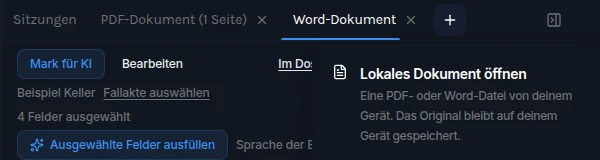
- 1"+" opens the menu with "Open Local Document."
- 2Select“Open Local Document.” Your form will open in a separate tab.
- 3Related dossier —check here.
Select the fields— mentalhealthGPT will fill them in.
First, select the language for the entries. It may take a minute or longer to fill them out.
Filling in a specific field: Select only that field, check the "To the Document" box in the DossierChat , and specify what should be entered—for example, "In the 'Diagnosis' field, enter only the primary diagnosis with the ICD-11 code." Here's how the dialog works
mentalhealthGPT never fills in checkboxes, radio buttons, or lists. You set those yourself.
For PDFs without form fields: Drag a box over the empty area. This will create a field.
In Word: Not every position can be filled. The list titled “… Positions that cannot be filled here” lists the position and the reason.
When mentalhealthGPT asks
- If the purpose of a field is unclear, a question appears above the form.
- Select a category and click “Please fill out these fields, ” or “None of the above—I’ll enter it myself.”
What is being broadcast
- Only the form text: labels, questions, and the structure of the selected fields; no field contents.
- Your browser replaces the names in it before sending.
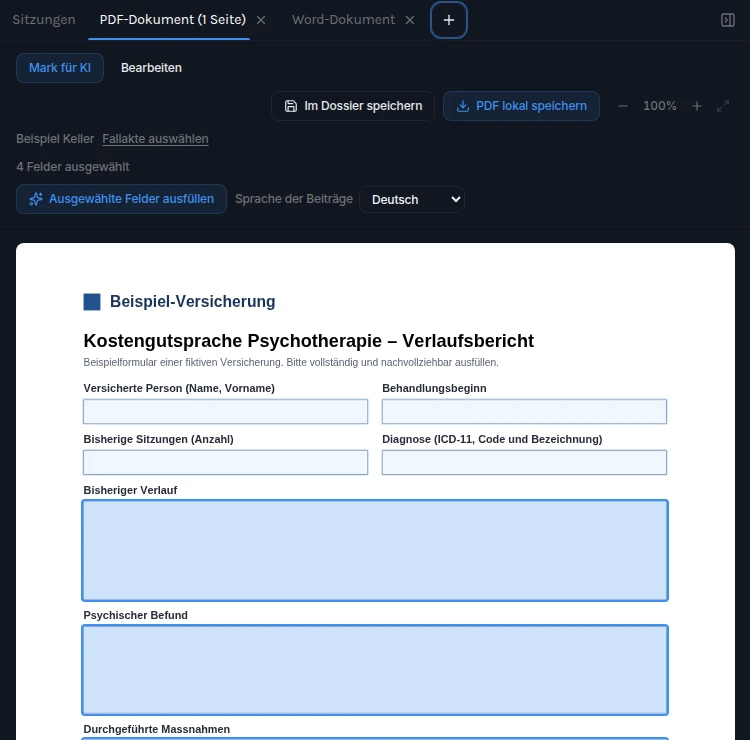
- 4Selection is enabled: One click selects a field.
- 5Selected fields are highlighted and counted.
- 6Select a language, then click “Fill in Selected Fields.”
Check each entry.
Entries without a note are supported by the dossier. Where there is no basis for an entry, the field remains blank, with a note. Nothing is omitted.
mentalhealthGPT only fills in safety-related fields, such as suicidal tendencies, if there is sufficient basis to do so; otherwise: “Safety-related—please fill in yourself.”
Make corrections and additions directly in the field while in "Edit" mode. In Word, clicking in the field opens a text box: Press Enter to submit, or Esc to cancel. You remain responsible for the content.
What the notes mean
- "Please check this entry": set, but with weaker evidence. Read carefully.
- "No relevant entry in the file": There is nothing about this in the file. Fill it in yourself or leave it blank.
- "The entry does not fit in this field": cannot be displayed in full, so it is left blank. Please rephrase it yourself.
- "Meaning unclear—see the question above": Answer the follow-up question.
- "Names could not be recovered—left blank": Fill in yourself.
- "Not available for automatic completion": often administrative details such as a name or date. Enter them yourself.
- "Already filled out—leave as is": mentalhealthGPT does not overwrite anything.
- 7List of notes above the form.
- 8Warning signs at the affected field.
- 9Left blank because the basis is insufficient—you decide.
Save your form.
If you save locally, mentalhealthGPT will also store the content in the dossier. You don't have to choose.
Save first, then close. Clicking the "×" on a tab closes it without a confirmation prompt; any unsaved entries will be lost. The same applies when reloading the page.
What the PDF file contains
- A final copy: The entries are permanently embedded in the document; it no longer contains any form fields.
- Your working version remains editable in the tab.
What the Word file contains
- Text entered in text fields becomes regular text; empty fields, checkboxes, and lists remain form fields. The file format remains that of your template.
- Protected form: "Save editable copy" removes protection from the copy; "Keep protection" leaves the entries as form fields.
- Digitally signed: Before making the first change, mentalhealthGPT asks for confirmation ("Change anyway"), because any change invalidates the signature.
- mentalhealthGPT never executes macros or modifies them.
Checkboxes, radio buttons, and lists are not included in the dossier; they are only in your local file.
Fill out the form: You tell us what matters.
"Fill in Selected Fields" fills out the fields all at once. In the dossierChat , you take the lead: You specify the purpose and focus, and then refine each entry one by one. The clearer your instructions, the more accurate the entry will be.
- Select fields in the form: multiple or just one.
- In the" Chat ," check the box next to "Zum Dokument."
- Explain what the form is for and what is important. Before submitting it, check the recognized personal data as usual.
What the " Chat " Can Do
- Fill in the blank fields, summarize your own AI entries—making them shorter, more detailed, or in a different language—or enter your dictated text.
- mentalhealthGPT will only replace an existing entry if you specifically request it.
- The form and Chat must be part of the same dossier. Progress updates and inquiries will appear at Chat.
This is my report for the family doctor. She is considering prescribing medication and would like my opinion. Fill in the four highlighted fields: be factual, avoid technical jargon, and limit each entry to no more than four sentences.
The recommendation is too cautious for my liking. State clearly that I think it makes sense to review the medication, and explain why based on the patient's progress.
Thank you. Please condense the findings into two sentences, starting with the sleep section.
This is how to make your instructions clear
This is the progress report for the insurance pre-approval of costs.
In the summary, include the changes since the first session; mention the work situation only briefly.
Keep it factual, avoid jargon, and limit it to four sentences at most.
Be more specific in the “Next Steps” section: set two measurable goals for the coming weeks.
Ask first, then fill it out. Without “Go to Document,” discuss the case as usual—for example, “Based on the previous sessions, what is the strongest argument for continuing?” The answer will help you refine your instructions.
When something doesn't work out
A field remains empty
No corresponding entry in the fileThere is nothing about this in the dossier. Fill it in yourself or leave it blank.
Safety-related—please fill out yourselfThe basic information is not sufficient. Please fill this out yourself.
Names could not be recovered—left blankFill in yourself.
Not available for automatic fillingNo matching assignment; often administrative information. Enter it yourself.
The text doesn't fit in the field
The entry does not fit in this fieldNothing will be truncated; the field will remain empty. Please rephrase the content yourself.
Prepare Your Own Word Template
Heading and Input FieldFormat the heading in Word as a “Heading,” for example, “Psychological Assessment,” and insert an input field below it: Developer Tools → Controls → Rich Text Content Control. This way, mentalhealthGPT can recognize what belongs in which field.
What Else Is PossiblementalhealthGPT also fills out standard form fields, checkboxes, and drop-down lists.
What You Enter YourselfYou can enter administrative details such as your name or the date.
I can't open or fill out my form
This is a dynamic Adobe form (XFA). It cannot be filled out here yet.Ask the publisher for a PDF or Word version.
This PDF does not contain any recognizable text layers …The PDF is a scan. Use a searchable version.
The form fields could not be displayed. …Don't rely on empty fields; reopen the form.
The form won't start filling out or stops midway
No clinical summary is available for this case yet, …First, include the meetings or transcripts in the file and wait for the evaluation.
None of the selected fields can be filled in automatically.Select empty text fields.
One name in this text could not be reliably protected. Nothing was sent to the AI.The protection has taken effect. Please try again or fill it in yourself.
Too many requests in a short period of time. …Please wait a few minutes.
It took too long to fill out the fields. Nothing was entered.Please try again later.
This form is too long to include in its entirety. …Fill out the form yourself.
The document has changed in the meantime. Please start over from the beginning.Select the fields again and have them filled out once more.
Checkboxes remain empty
Please select the answer yourselfYou always set checkboxes, radio buttons, and lists yourself.
More on this: Confidentiality